I used to treat Free Fire settings like the terms and conditions on a new phone: I tapped accept and hoped for the best. Then, during a ranked match in 2026, my AWM scope drifted like a paper boat in a storm, and I lost a 1v1 I should have won. That loss pushed me to rebuild every menu. After thousands of matches across classic Free Fire and Free Fire MAX, I finally have a setup that feels less like random toggles and more like a second pair of hands. This is my first-person guide to the best Free Fire settings for me, and maybe for you.
BASIC - Free Fire Settings 🎯
I keep my basic settings strict because chaos in the menu becomes chaos in a firefight. My choices are:
| Setting | My choice |
|---|---|
| Minimap | Rotating |
| Auto Scale | Off |
| Aim Precision | Default |
| Left Fire Button | Always |
| Quick Weapon Switch | On |
| Quick Reload | On |
| AWM Sniping | Normal |
| Vehicle Control | Two Handed |
| Auto Parachute | On |
| In-game Tips | Default |
| Damage Indicator | New |
| Auto Gun Switch | On |
| Visual Effects | Classic |
| Free Look | On |
| Hitmarker | New |
| Teammate Info | Translucent |
A rotating minimap feels alive, while a fixed one feels like a paper map nailed to a wall. Auto Scale stays off so my UI does not shift when I change weapons. Left Fire Button is always on because my thumb already lives there. Quick Weapon Switch and Quick Reload are non-negotiable in 2026, where a half-second delay is a death sentence. AWM Sniping stays Normal; the other modes make my scope feel drunk. Vehicle Control is Two Handed because I want to steer and shoot without fighting my own fingers. Auto Parachute saves me from early drops, and In-game Tips stays Default because I still like small reminders. Damage Indicator and Hitmarker are both New for clearer feedback. Auto Gun Switch helps when I panic-swap. Visual Effects is Classic because Ultra effects turn my screen into a fireworks show. Free Look is On for awareness, and Teammate Info is Translucent so it does not block my view.
CONTROLS - Free Fire Settings 🎮
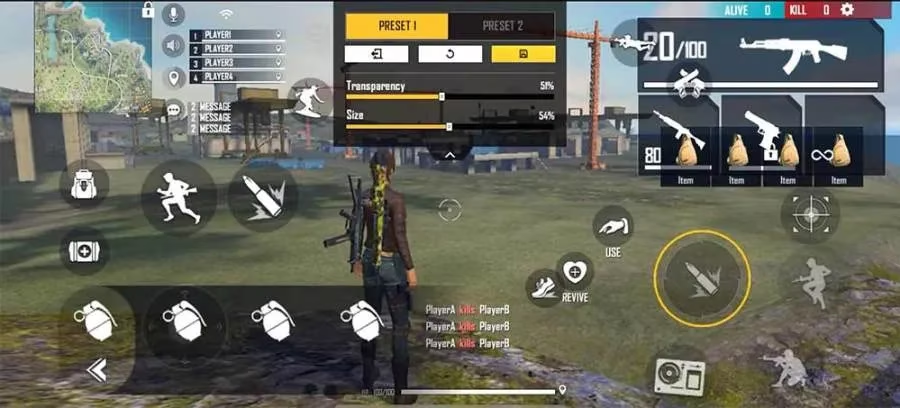
Controls are personal. My custom HUD is not yours, and that is fine. I arrange my fire button, scope, crouch, jump, and reload so my fingers never cross. A custom HUD is like a kitchen before cooking: if the knife is across the room, you starve. I use a four-finger claw on a mid-range device, but two-thumb players can still win with a clean layout. The goal is simple: every button should be a reflex, not a decision.
AUTO PICKUP - Free Fire Settings 🎒
Auto pickup without rules is a raccoon at a picnic. It will stuff your bag with junk and leave the good stuff behind. My auto pickup setup is:
| Item | Setting |
|---|---|
| Weapons | On |
| Armor and Backpacks | On |
| Medkits | On |
| Ammo | On |
| Attachments | On |
| Grenades | On |
| Special Equipment | Off |
| Event Items | On |
| Auto Pickup Speed | Fast |
I keep Special Equipment off because I want to choose when to carry a shield or launcher. Event Items stay on for missions and limited-time rewards in 2026. Fast pickup speed is essential because looting is a race, not a shopping trip. Weapons, armor, medkits, ammo, attachments, and grenades all come automatically, so I can keep my eyes on the map instead of the ground.
GRAPHICS - Free Fire Settings 🖥️
Graphics are a balancing act between beauty and frame rate. In 2026, I still choose performance first. My guide is:
| Setting | My choice |
|---|---|
| Graphics | Smooth for low-end devices, Standard for mid-range, Ultra for high-end |
| High Res. | Normal |
| Shadow | On |
| Filter | Vivid |
| High FPS | High |
Smooth is the safe harbor for low-end phones. Standard is the sweet spot for mid-range devices. Ultra is for high-end machines that can stay cool under pressure. High Res. stays Normal because I would rather have stable frames than sharper grass. Shadow is On because enemy silhouettes matter. Vivid filter makes enemies pop against dull backgrounds. High FPS is High because smooth motion wins fights. If your phone overheats, drop one level and thank yourself later.
SOUND - Free Fire Settings 🔊
Sound is the oldest cheat code. My settings are:
| Setting | My choice |
|---|---|
| Music | 0 |
| Sound Effects | 100 |
| Voice | 60 |
Music at 0 removes distraction. Sound Effects at 100 lets me hear footsteps, reloads, and grenade pins. Voice at 60 keeps teammates audible without blowing out my ears. In 2026, audio cues still decide more fights than raw aim. A player who listens is a player who survives.
Sensitivity - The Missing Section ✋
I did not list sensitivity numbers because sensitivity is a handshake with a ghost: too firm and you miss, too loose and it slips away. It depends on your screen size, finger size, grip, and device. Start at 60, then test in training. Increase or decrease by 5 until drag headshots and close-range sprays feel natural. Do not copy a pro blindly. Your hands are not their hands.
Final Thoughts 🏁
These are my best Free Fire settings for 2026. They are a baseline, not a religion. Change them for your device, your playstyle, and your comfort. The best settings are the ones that make your hands feel invisible. Tune, test, and trust your reflexes. When the next match starts, you should be thinking about the enemy, not the menu.
Expert commentary is drawn from Digital Foundry, and it reinforces the same lesson your 2026 Free Fire settings diary keeps returning to: stable performance beats pretty effects when your goal is consistent aim. If your AWM scope feels like it “drifts,” it’s often not just sensitivity—it can be uneven frame pacing, thermal throttling, or heavy visual features that add input latency, so prioritizing smoother graphics tiers, a higher FPS mode, and avoiding unnecessary effects can make your crosshair feel more “locked in” during fast peeks and close-range sprays.